listviewer
'htmlwidget' for Interactive Views of R Lists
R lists, especially nested lists, can be very difficult to visualize or represent. Sometimes 'str()' is not enough, so this suite of htmlwidgets is designed to help see, understand, and maybe even modify your R lists. The function 'reactjson()' requires a package 'reactR' that can be installed from CRAN or <https://github.com/timelyportfolio/reactR>.
README
# vanilla-jsoneditor
A web-based tool to view, edit, format, transform, and validate JSON.
Try it out: https://jsoneditoronline.org
This is the vanilla variant of `svelte-jsoneditor`, which can be used in vanilla JavaScript or frameworks like SolidJS, React, Vue, Angular.
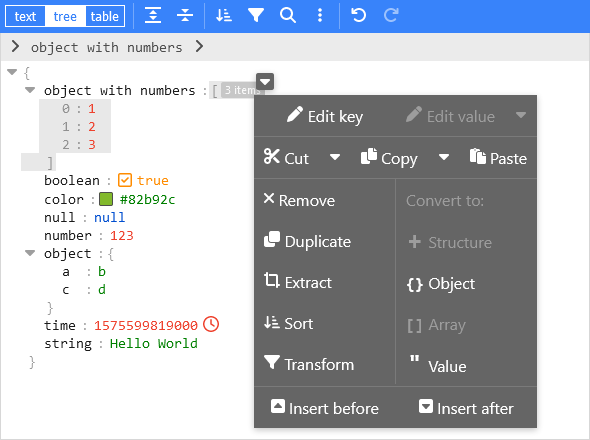
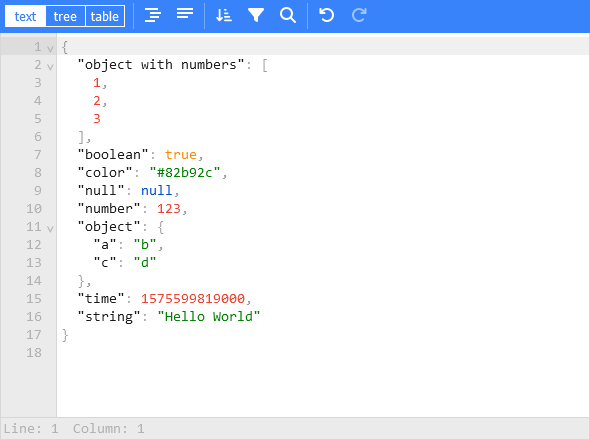
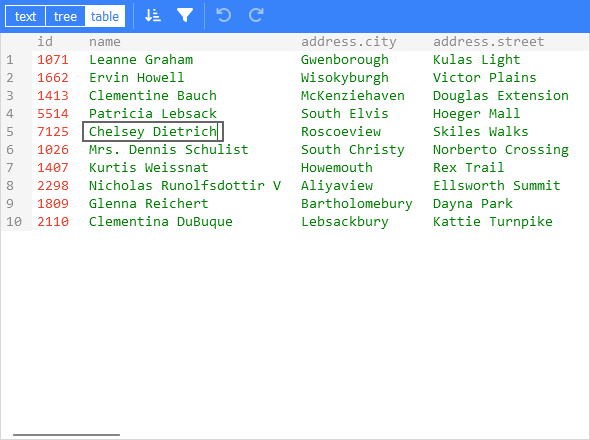
## Features
- View and edit JSON
- Has a low level text editor and high level tree view and table view
- Format (beautify) and compact JSON
- Sort, query, filter, and transform JSON
- Repair JSON
- JSON schema validation and pluggable custom validation
- Color highlighting, undo/redo, search and replace
- Utilities like a color picker and timestamp tag
- Handles large JSON documents up to 512 MB
## Install
Install using npm:
```
npm install vanilla-jsoneditor
```
Remark: for usage in a Svelte project, install `svelte-jsoneditor` instead.
## Use (Browser example loading the ES module):
```html
<!doctype html>
<html lang="en">
<head>
<title>JSONEditor</title>
</head>
<body>
<div id="jsoneditor"></div>
<script type="module">
import { JSONEditor } from 'vanilla-jsoneditor'
// Or use it through a CDN (not recommended for use in production):
// import { JSONEditor } from 'https://unpkg.com/vanilla-jsoneditor/index.js'
// import { JSONEditor } from 'https://cdn.jsdelivr.net/npm/vanilla-jsoneditor/index.js'
let content = {
text: undefined,
json: {
greeting: 'Hello World'
}
}
const editor = new JSONEditor({
target: document.getElementById('jsoneditor'),
props: {
content,
onChange: (updatedContent, previousContent, { contentErrors, patchResult }) => {
// content is an object { json: JSONData } | { text: string }
console.log('onChange', { updatedContent, previousContent, contentErrors, patchResult })
content = updatedContent
}
}
})
// use methods get, set, update, and onChange to get data in or out of the editor.
// Use updateProps to update properties.
</script>
</body>
</html>
```
## Use (React example, including NextJS)
### First, create a React component to wrap the vanilla-jsoneditor
Depending on whether you are using JavaScript of TypeScript, create either a JSX or TSX file:
### TypeScript:
```typescript
//
// JSONEditorReact.tsx
//
import { useEffect, useRef } from 'react'
import { JSONEditor, JSONEditorPropsOptional } from 'vanilla-jsoneditor'
const JSONEditorReact: React.FC<JSONEditorPropsOptional> = (props) => {
const refContainer = useRef<HTMLDivElement>(null)
const refEditor = useRef<JSONEditor | null>(null)
useEffect(() => {
// create editor
refEditor.current = new JSONEditor({
target: refContainer.current!,
props: {}
})
return () => {
// destroy editor
if (refEditor.current) {
refEditor.current.destroy()
refEditor.current = null
}
}
}, [])
useEffect(() => {
// update props
if (refEditor.current) {
refEditor.current.updateProps(props)
}
}, [props])
return <div ref={refContainer} />
}
export default JSONEditorReact
```
### JavaScript
```javascript
//
// JSONEditorReact.jsx
//
import { useEffect, useRef } from 'react'
import { JSONEditor, JSONEditorPropsOptional } from 'vanilla-jsoneditor'
const JSONEditorReact = (props) => {
const refContainer = useRef(null)
const refEditor = useRef(null)
useEffect(() => {
// create editor
refEditor.current = new JSONEditor({
target: refContainer.current,
props: {}
})
return () => {
// destroy editor
if (refEditor.current) {
refEditor.current.destroy()
refEditor.current = null
}
}
}, [])
// update props
useEffect(() => {
if (refEditor.current) {
refEditor.current.updateProps(props)
}
}, [props])
return <div ref={refContainer} />
}
export default JSONEditorReact
```
### Import and use the React component
If you are using NextJS, you will need to use a dynamic import to only render the component in the browser (disabling server-side rendering of the wrapper), as shown below in a NextJS TypeScript example.
If you are using React in an conventional non-NextJS browser app, you can import the component using a standard import statement like `import JSONEditorReact from '../JSONEditorReact'`
```typescript
//
// demo.tsx for use with NextJS
//
import dynamic from 'next/dynamic'
import { useCallback, useState } from 'react'
//
// In NextJS, when using TypeScript, type definitions
// can be imported from 'vanilla-jsoneditor' using a
// conventional import statement (prefixed with 'type',
// as shown below), but only types can be imported this
// way. When using NextJS, React components and helper
// functions must be imported dynamically using { ssr: false }
// as shown elsewhere in this example.
//
import type { Content, OnChangeStatus } from 'vanilla-jsoneditor'
//
// In NextJS, the JSONEditor component must be wrapped in
// a component that is dynamically in order to turn off
// server-side rendering of the component. This is neccessary
// because the vanilla-jsoneditor code attempts to use
// browser-only JavaScript capabilities not available
// during server-side rendering. Any helper functions
// provided by vanilla-jsoneditor, such as toTextContent,
// must also only be used in dynamically imported,
// ssr: false components when using NextJS.
//
const JSONEditorReact = dynamic(() => import('../JSONEditorReact'), { ssr: false })
const TextContent = dynamic(() => import('../TextContent'), { ssr: false })
const initialContent = {
hello: 'world',
count: 1,
foo: ['bar', 'car']
}
export default function Demo() {
const [jsonContent, setJsonContent] = useState<Content>({ json: initialContent })
const handler = useCallback(
(content: Content, previousContent: Content, status: OnChangeStatus) => {
setJsonContent(content)
},
[jsonContent]
)
return (
<div>
<JSONEditorReact content={jsonContent} onChange={handler} />
<TextContent content={jsonContent} />
</div>
)
}
```
```typescript
//
// TextContent.tsx
//
// (wrapper around toTextContent for use with NextJS)
//
import { Content, toTextContent } from 'vanilla-jsoneditor'
interface IOwnProps {
content: Content
}
const TextContent = (props: IOwnProps) => {
const { content } = props
return (
<p>
The contents of the editor, converted to a text string, are: {toTextContent(content).text}
</p>
)
}
export default TextContent
```
Versions across snapshots
| Version | Repository | File | Size |
|---|---|---|---|
4.0.0 |
rolling linux/jammy R-4.5 | listviewer_4.0.0.tar.gz |
494.2 KiB |
4.0.0 |
rolling linux/noble R-4.5 | listviewer_4.0.0.tar.gz |
494.2 KiB |
4.0.0 |
rolling source/ R- | listviewer_4.0.0.tar.gz |
469.6 KiB |
4.0.0 |
latest linux/jammy R-4.5 | listviewer_4.0.0.tar.gz |
494.2 KiB |
4.0.0 |
latest linux/noble R-4.5 | listviewer_4.0.0.tar.gz |
494.2 KiB |
4.0.0 |
latest source/ R- | listviewer_4.0.0.tar.gz |
469.6 KiB |
4.0.0 |
2026-04-26 source/ R- | listviewer_4.0.0.tar.gz |
469.6 KiB |
4.0.0 |
2026-04-23 source/ R- | listviewer_4.0.0.tar.gz |
469.6 KiB |
4.0.0 |
2026-04-09 windows/windows R-4.5 | listviewer_4.0.0.zip |
500.8 KiB |
4.0.0 |
2025-04-20 source/ R- | listviewer_4.0.0.tar.gz |
469.6 KiB |