knitcitations
Citations for 'Knitr' Markdown Files
Provides the ability to create dynamic citations in which the bibliographic information is pulled from the web rather than having to be entered into a local database such as 'bibtex' ahead of time. The package is primarily aimed at authoring in the R 'markdown' format, and can provide outputs for web-based authoring such as linked text for inline citations. Cite using a 'DOI', URL, or 'bibtex' file key. See the package URL for details.
README
knitcitations
=============
- **Author**: [Carl Boettiger](http://www.carlboettiger.info/)
- **License**: [CC0](http://creativecommons.org/publicdomain/zero/1.0/)
- [Package source code on Github](https://github.com/cboettig/knitcitations)
- [**Submit Bugs and feature requests**](https://github.com/cboettig/knitcitations/issues)
`knitcitations` is an R package designed to add dynamic citations to dynamic documents created with [Yihui's knitr package](https://github.com/yihui/knitr).
Installation
------------
Install the development version directly from Github
```r
library(devtools)
install_github("knitcitations", "cboettig")
```
Or install the current release from your CRAN mirror with `install.packages("knitcitations")`.
Quick start
-----------
It is usually good to clear the bibliographic environment after loading the library, in case any citations are already stored there.
```{r load, echo=FALSE}
library(knitcitations)
newbib()
```
`r cite_options(linked=FALSE)`
### Cite by DOI
Cite an article by DOI and the full citation information is gathered automatically.
```{r results="asis", comment=NA}
citep("10.1890/11-0011.1")
```
Typically this is done with knitr's inline code syntax, creating a parenthetical citation in the text like this `r citep("10.1890/11-0011.1")`. We display the command in code blocks only for documenting purposes here. `citep` provides a parenthetical citation; a in-text citation is generated with `citet`, such as this sentence cites `r citet("10.1890/11-0011.1")`.
### Cite by URL
Not all the literature we may wish to cite includes DOIs, such as [arXiv](http://arxiv.org) preprints, Wikipedia pages, or other academic blogs. Even when a DOI is present it is not always trivial to locate. With version 0.4-0, `knitcitations` can produce citations given any URL using the [Greycite API](http://greycite.knowledgeblog.org). For instance, we can use the call
```{r results="asis", comment=NA}
citep("http://knowledgeblog.org/greycite")
```
to generate the citation to the Greycite tool.
### Cite from a bibtex file
If we have a bibtex file, we can cite such articles by those keys as well. To demonstrate, let's first create a bibtex file with the citation information for some R packages, using the `bibtex` package utilities (a dependency of `knitcitations`):
```{r message=FALSE}
write.bibtex(c("Yihui2013" = citation("knitr"), "Boettiger2013" = citation("knitcitations")))
bib <- read.bibtex("knitcitations.bib")
```
Now we can generate citations from `bib`
```{r message=FALSE, results="asis"}
citep(bib[[2]])
citep(bib["Yihui2013"])
```
### Re-using Keys
When the citation is called, a key in the format `LastNameYear` is automatically created for this citation, so we can now continue to cite this article without remembering the DOI, using the command:
```{r results="asis"}
citep("Abrams2012")
```
Note that a custom key can also be given by naming the DOI, such as `citep(c(AbramsEtAl="10.1890/11-0011.1"))`.
### Displaying the final bibliography
At the end of our document we can generate the traditional "References" or "Works Cited" list in a knitr block using the chunk option `results='asis'` to display as text rather than code:
```{r results="asis"}
bibliography()
```
Other formats can be given as options to `bibliography`, as described in the help documentation, `?bibliography`. For instance, we can specify the format as "markdown". The custom formats "markdown" and "rdfa" take an additional argument, "ordering", which can specify what elements we want to print and what order they should be given in. For instance, we can omit everything but the authors, year, and journal, given in that order:
```{r results="asis"}
bibliography("markdown", ordering=c("authors", "year", "journal"))
```
(Note that since version 0.5, "markdown" is the default and can be omitted)
### Links and tooltips
In-text citations are now linked by default to the article. We can turn this on or off in a single citation like so: `citep("Abrams2012", linked=TRUE)`, creating the citation `r citep("Abrams2012", linked=TRUE)`. We can toggle this behavior on or off globally using `cite_options(linked=TRUE)` at the beginning of our document.
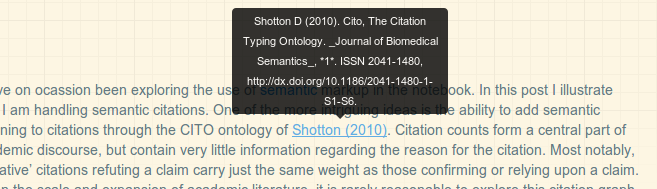
Using the popular javascript library from [bootstrap](http://twitter.github.com/bootstrap), we can tell `knitcitations` to include a javascript tooltip on mouseover. (This effect will not work inside a github repo due the the lack of the javascript library, but can easily be deployed on a website, see `r citet("http://carlboettiger.info/2013/02/22/semantic-citations-for-the-notebook-and-knitr.html", cito="discusses")`. This function is off by default can be toggled on or off in the same way, `cite_options(tooltip=TRUE)`.
## Semantics
### CiTO
Additional semantic markup can be added the the citations themselves, such as the reason for the citation. For instance, we can identify that we have used the method from `r citet("10.1186/2041-1480-1-S1-S6", cito = "usesMethodIn")` with the inline command `citet("10.1186/2041-1480-1-S1-S6", cito = "usesMethodIn")`.
More discussion on using `knitcitations` for CITO and semantic markup can be found in `r citet("http://carlboettiger.info/2013/02/22/semantic-citations-for-the-notebook-and-knitr.html", cito="usesMethodIn")`.
Versions across snapshots
| Version | Repository | File | Size |
|---|---|---|---|
1.0.12 |
rolling linux/jammy R-4.5 | knitcitations_1.0.12.tar.gz |
66.4 KiB |
1.0.12 |
rolling linux/noble R-4.5 | knitcitations_1.0.12.tar.gz |
66.2 KiB |
1.0.12 |
rolling source/ R- | knitcitations_1.0.12.tar.gz |
31.8 KiB |
1.0.12 |
latest linux/jammy R-4.5 | knitcitations_1.0.12.tar.gz |
66.4 KiB |
1.0.12 |
latest linux/noble R-4.5 | knitcitations_1.0.12.tar.gz |
66.2 KiB |
1.0.12 |
latest source/ R- | knitcitations_1.0.12.tar.gz |
31.8 KiB |
1.0.12 |
2026-04-26 source/ R- | knitcitations_1.0.12.tar.gz |
31.8 KiB |
1.0.12 |
2026-04-23 source/ R- | knitcitations_1.0.12.tar.gz |
31.8 KiB |
1.0.12 |
2026-04-09 windows/windows R-4.5 | knitcitations_1.0.12.zip |
75.4 KiB |
1.0.12 |
2025-04-20 source/ R- | knitcitations_1.0.12.tar.gz |
31.8 KiB |